For teams that build software for other businesses
You build for property managers, staffing firms, clinics, agencies or freight brokers. Sooner or later every one of them asks for the same thing: send this for signature, without leaving your app.
The usual answers are poor. Build it yourself and you own seals, evidence and the law. Resell a big-name signing product and your customers see someone else's brand, you pay for seats you don't use, and embedded signing sits on an enterprise plan. docuinked gives you the signing layer and stays out of the way.
One account per customer, one key for all of them
Create a sub-account for each of your customers. Then act for any of them by adding one header to a normal call, with your own key. Each sub-account has its own documents, its own branding and its own webhooks, so one customer never sees another's work.
curl https://docuinked.com/v1/accounts \
  -H "Authorization: Bearer $DOCUINKED_API_KEY" \
  -H "Content-Type: application/json" \
  -d '{"name": "Cedar Row Rentals"}'
curl https://docuinked.com/v1/documents \
-H "Authorization: Bearer $DOCUINKED_API_KEY" \
-H "DocuInked-Account: acct_..." \
-H "Idempotency-Key: lease-2291" \
-H "Content-Type: application/json" \
-d '{"title": "Lease renewal", ...}'Your customer's brand on every page
Set a display name, an accent colour and a logo for each sub-account. Signer pages and signing emails use them. Turn on hide_docuinked_branding and our name comes off what signers see.
List the sites allowed to embed signing in the same call.
curl https://docuinked.com/v1/branding \
  -H "Authorization: Bearer $DOCUINKED_API_KEY" \
  -H "DocuInked-Account: acct_..." \
  -H "Content-Type: application/json" \
  -d '{"display_name": "Cedar Row Rentals",
       "accent_color": "#0F766E",
       "logo_png_base64": "iVBORw0KGgo...",
       "hide_docuinked_branding": true,
       "embed_origins": ["https://app.example.com"]}'
Signing that stays inside your app
Ask create_signing_link for embed: true and you get an embed_url. Load it in an iframe on one of your listed sites. The signer reviews and signs without leaving your page.
The frame tells your page what happened with a browser message: loaded, signed or declined. Your page moves on, and your server hears the same news from the webhook.
const frame = document.createElement("iframe");
frame.src = embedUrl; // from create_signing_link with embed: true
document.querySelector("#sign").append(frame);

window.addEventListener("message", (e) => {
  if (e.origin !== "https://docuinked.com") return;
  if (e.data.type === "docuinked:signed") showDone(e.data.document);
  if (e.data.type === "docuinked:declined") showDeclined();
});
What your customers see
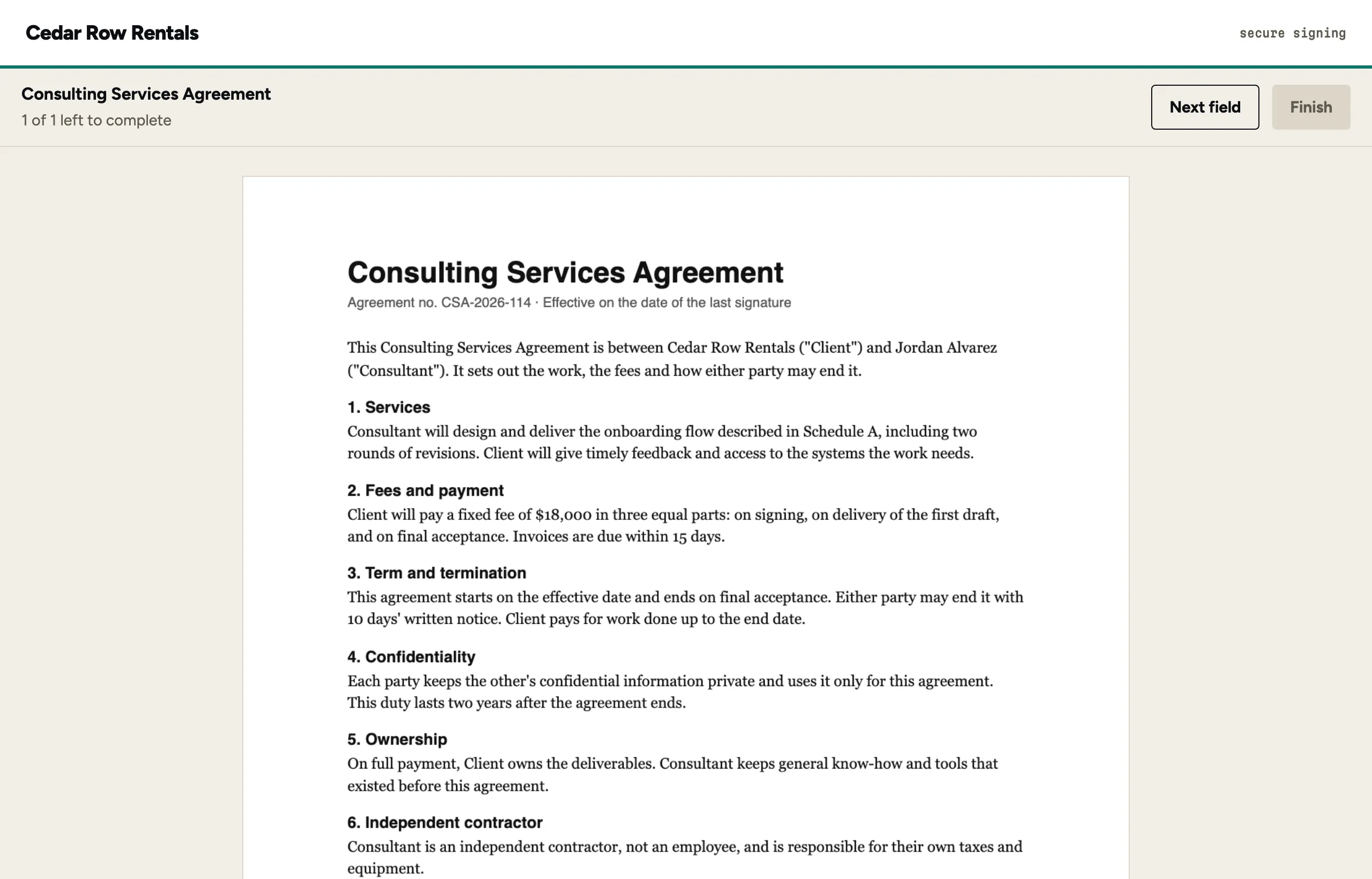
This is the signer page as it looks in a sub-account with its own name and colour, inside a host page. The consent step, the fields and the seal work exactly as they do everywhere else in docuinked.
How to price it to your customers
Signing is a feature of your product, so price it like one. Most shops pick one of three ways: include it in every plan, include a number of documents a month and charge for more, or sell it as an add-on.
Your cost is $0.75 per completed document across all your sub-accounts, with your first 5 free, and no platform fee. Your customers in sub-accounts are not seats (Personal at $9 a month is for one person and Team at $15 a seat for your own staff, each with a fair-use cap of 500 completed documents per seat a year) (pricing). At that cost a $5 a month add-on with ten documents included still leaves room. If you plan to run many customers, write to support@docuinked.com first so we can size your limits.
What you get, and what's coming
Branding
Name, logo and accent colour per sub-account, with our branding removable. Available now.
Embedded signing
An iframe on your listed sites, with browser events for loaded, signed and declined. Available now.
Sub-accounts
One per customer, each with its own documents, branding and webhooks, all from your key. Available now.
Webhooks
Signed events per sub-account, so each customer's documents report to the right place. Available now.
Custom signing domains
Signing links on your own domain, like sign.yourapp.com. Coming.
Custom email domains
Signing emails sent from your own domain. Coming. Until then, emails come from docuinked's address with your customer's name on them.