The problem with "please be careful"
An agent that can call "send" can email a contract to anyone. You can tell it to ask first, but a prompt is a suggestion. So is a tool description. And agents read text inside documents, which someone else may have written.
docuinked doesn't ask the agent to behave. It refuses the call.
Connect in one line
The MCP server works with Claude, ChatGPT, Cursor, Codex, VS Code and any MCP client. Clients that sign in by browser use OAuth, where you approve the connection yourself. Others send a key in a header. Start with a test key, which can't email anyone.
claude mcp add --transport http docuinked https://docuinked.com/mcp \
  --header "Authorization: Bearer $DOCUINKED_API_KEY"
{"mcpServers": {"docuinked": {
"url": "https://docuinked.com/mcp",
"headers": {"Authorization": "Bearer di_test_..."}}}}What happens when your agent asks to send
This is the real reply a live agent key gets from send_document. Nothing was sent. The document is waiting, and the reply tells the agent what to do next.
A person opens the approval_url, reads the draft as the server holds it, and approves or rejects. The agent finds out from get_document or the approval.approved webhook.
{"status": "ok",
 "data": {
   "id": "doc_iONuGZ2Djdez8qUFBtfU",
   "status": "pending_approval",
   "approval_url": "https://docuinked.com/app/approvals/apr_qEgxtx8ivEmjTISyd4K6",
   "next_action": "Nothing was sent. Ask a person on this account
     to open approval_url and approve it. Webhook
     approval.approved fires when they do.",
   "sent_at": null}}
The person sees exactly what goes out
The approver sees the title, the message, every signer and every page, as the server holds them. The approval is bound to the draft's hash. If the agent changes a signer, a field or a single byte of the PDF afterwards, the approval is void and the send is refused.
Approval needs a signed-in person. There is no approve call in the API, so no key can approve its own request.
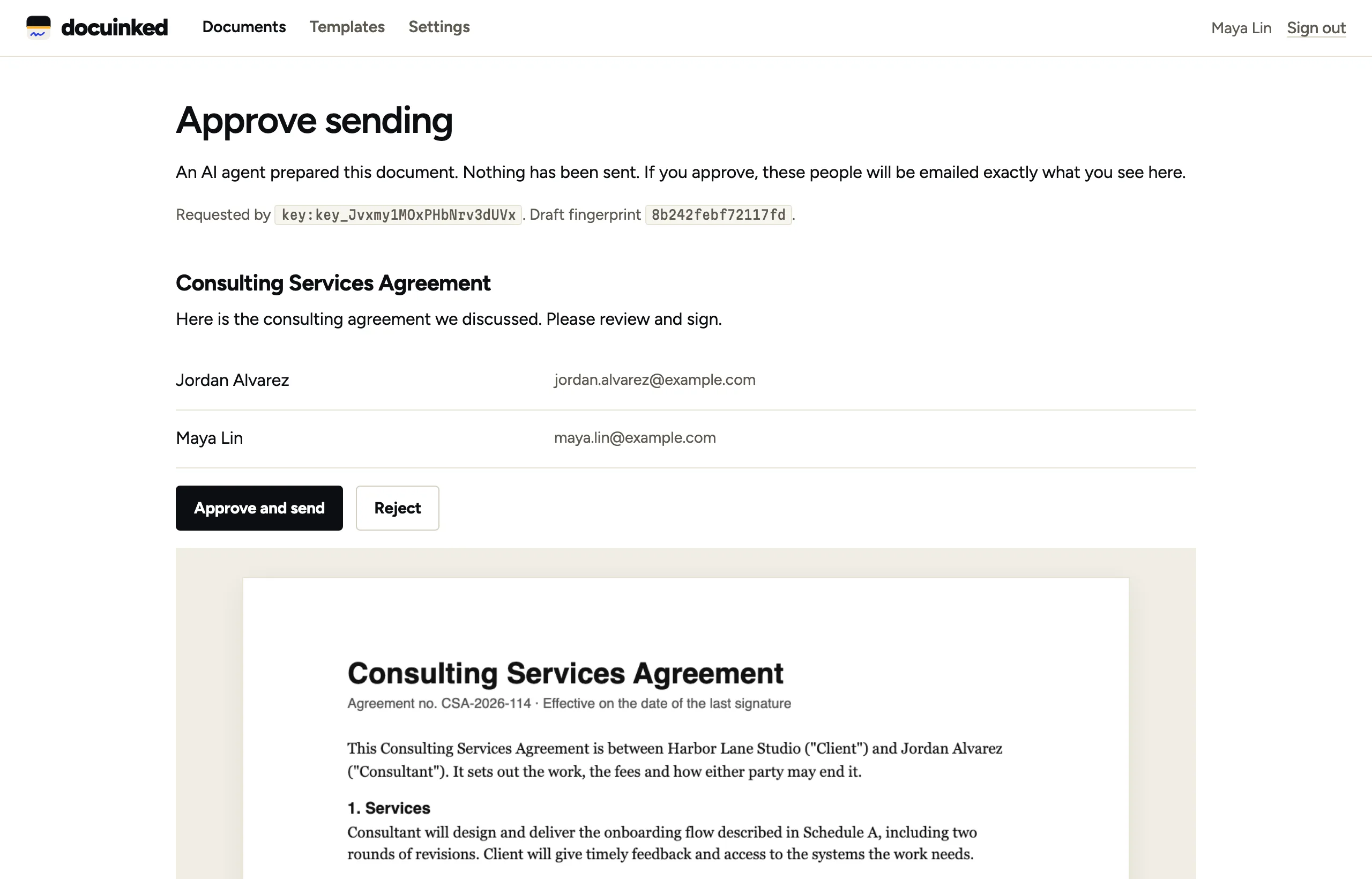
What your agent can and can't do
It can prepare
Create drafts from a PDF or a template, add signers, and place fields by anchor text, tags or coordinates.
It can ask
Request a send. With a live agent key, that request waits for a person.
It can follow up
Read status, send reminders, void a document, and fetch the sealed PDF and its evidence.
It can't sign
There is no sign endpoint. Agent keys can't get live signing links. Signers sign from their own email.
It can't approve
Approval happens only on a signed-in page. Anything that arrives over MCP counts as an agent, whatever key it uses.
It can practise
Test keys email no one and show the same approval step as live.
simulate_approvalandsimulate_signerlet an agent run the whole flow unattended while you build.
Honest limits
An approver can still approve a bad draft, so read it. A person with a "Sends directly" key can hand it to an agent over REST, and we can't stop that. An agent with full access to a signer's inbox could open that signer's link. For a high-value document, add an access code and share it outside email.
We'd rather tell you this than have you find out.